The Content Vacuum
Pull a whole content calendar as structured JSON.
Every WordPress site ships a REST API by default, and almost nobody turns it off. That means any competitor's blog running on WordPress, and a huge share of marketing blogs do, will hand you every post title, publish timestamp, and category tag as clean JSON. No HTML to parse, no pagination to click through by hand, just a URL you can hit from a terminal.
What to do: curl "site.com/wp-json/wp/v2/posts?per_page=100&page=1", then wp/v2/categories for the topic breakdown.
Why it works: WordPress's REST API serves structured post data by default. Cadence, categories, and topic mix, all in two requests, with no HTML scraping.
Example: techcrunch.com's endpoint is wide open, no auth, straight 200, and its own headers hand over an x-wp-total of 261,230 posts across 2,613 pages. A live 100-post sample showed 51 of them tagged AI.
Walk it through
I ran this against techcrunch.com in July 2026. Here is exactly what came back.
1. Pull the last 100 posts, then grab the header count.
curl -s "https://techcrunch.com/wp-json/wp/v2/posts?per_page=100&_fields=title,date,categories"
curl -sI "https://techcrunch.com/wp-json/wp/v2/posts" | grep -i x-wp
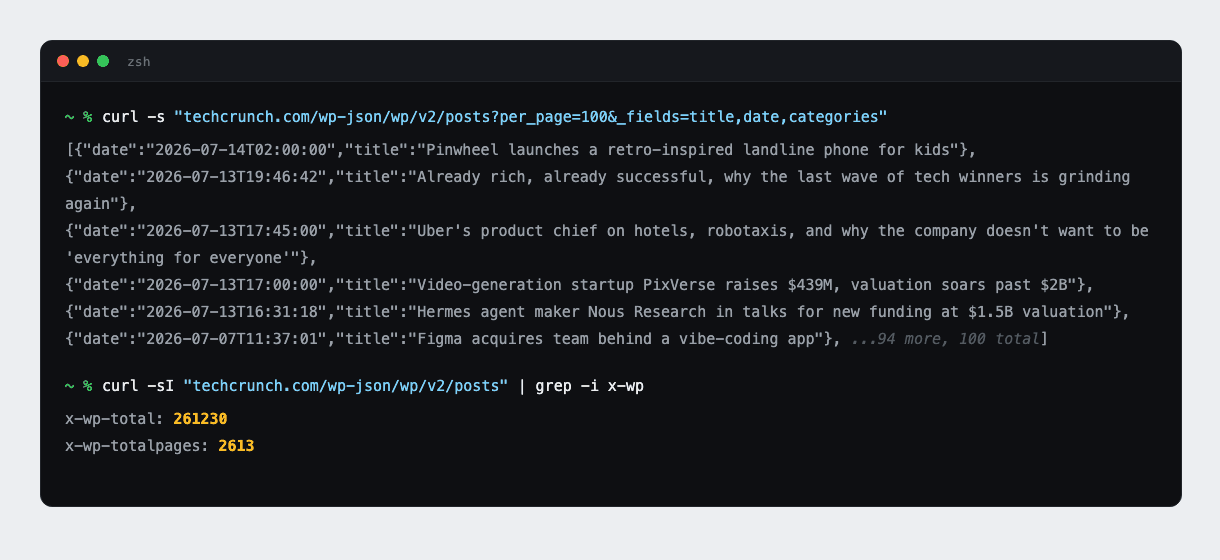
No login wall, no rate limit, just 100 posts with titles, timestamps, and category IDs handed over as plain JSON. The headers carry the real scale for free. x-wp-total: 261230 means that is the size of the whole archive, and at 100 posts per page that is 2,613 pages if you ever tried to pull all of it.
2. Pull categories, then cross-check against the sample you already have.
curl -s "https://techcrunch.com/wp-json/wp/v2/categories?per_page=20&_fields=id,name,count"
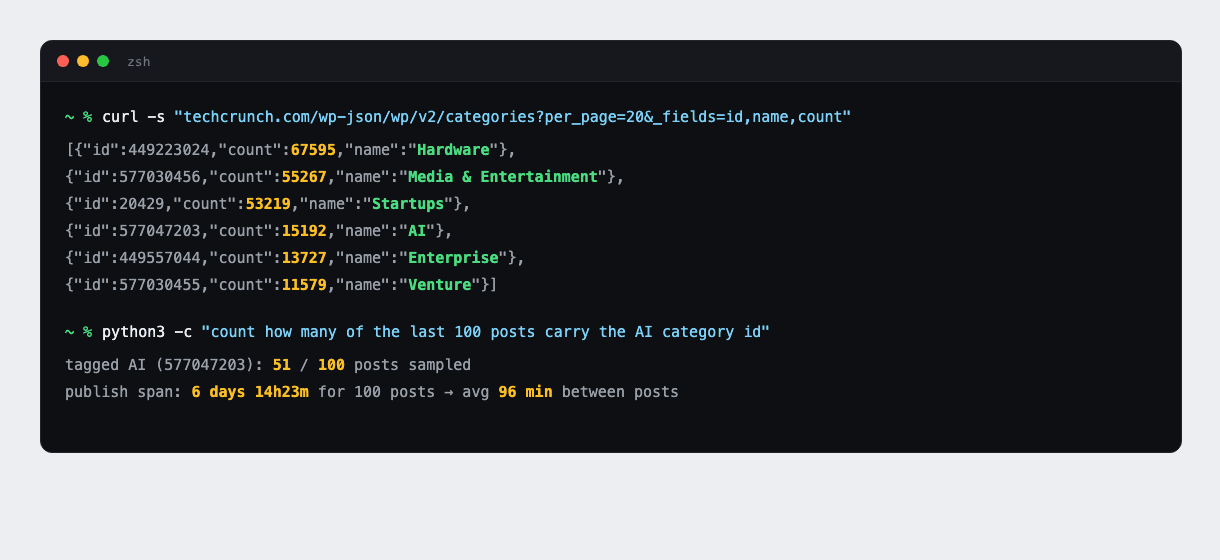
Hardware carries the largest lifetime count at 67,595, but lifetime count is a bucket that has existed for years. It is not this week's mix. So I cross-checked the 100 posts from step one against the AI category ID directly, and 51 of them carry it. Half of everything published in the last six and a half days was tagged AI. Those 100 posts span 6 days 14 hours and 23 minutes, which works out to a new post roughly every 96 minutes, around the clock.
3. Check what content types exist beyond the blog.
curl -s "https://techcrunch.com/wp-json/wp/v2/types"
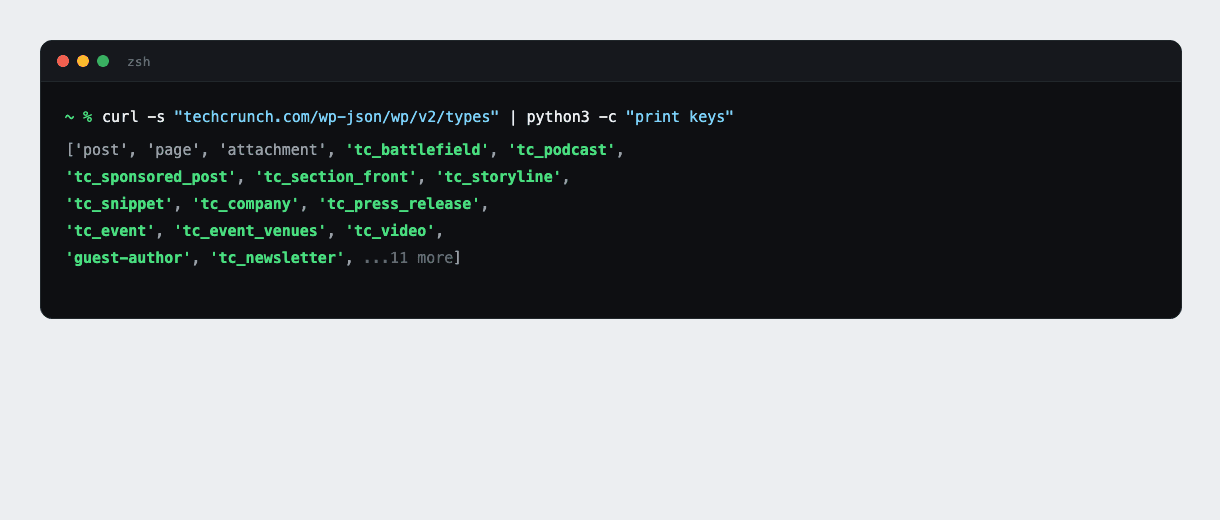
Beyond the standard post, the type list exposes tc_battlefield, tc_podcast, tc_sponsored_post, tc_storyline, tc_company, tc_press_release, tc_event, tc_video, guest-author, and tc_newsletter, among others. That is not a blog. That is a whole content operation laid out in one JSON array: a startup-competition brand, a podcast network, sponsored posts kept in a type separate from editorial, an events product, a company database, a newsletter. One endpoint, and you are looking at their content org chart.
The read
- Cadence is operational tempo. A new post every 96 minutes around the clock is a newsroom running a real editorial schedule, not a marketing team publishing on a Tuesday. Compare your own posting rhythm against that number honestly.
- Recent tags beat lifetime counts. The categories endpoint's
countfield is everything ever published under that label. It tells you history, not focus. Sampling live posts and checking which tag actually shows up tells you where the editorial budget is going right now. Here, that was AI, at roughly half of output. - Custom post types show you the whole business, not just the blog.
tc_battlefield,tc_sponsored_post, andtc_newsletterare product lines, not article tags. Wherever a competitor names its own post types, you can read their revenue structure off the schema.
Steal it
If your own product runs on WordPress, or your competitor's does, this works both directions. Run the same two-request pull against yourself first. If your x-wp-total and category counts are sitting there in plain JSON, so is your publishing cadence, and any competitor curious enough will read it the same way you just read TechCrunch's. Some teams disable the REST API or strip it down to the fields WordPress needs for the block editor. Decide if you want that visibility open or closed before someone else decides for you.
For your own competitive tracking, build a small script that pulls a competitor's last 100 posts weekly, tags the category mix, and logs the average time between posts. Watch the AI-tagged share, or whatever topic matters in your market, move over a quarter. A rising share tells you where they are pouring headcount before their homepage ever says so.
Gotchas
- Not every site runs WordPress, and not every WordPress site leaves the API open. A 403 or 404 on
/wp-json/just means this specific play does not apply here, not that the site has nothing to hide. _fieldstrims the JSON but not the page count. A 261,230-post archive is still 2,613 requests at 100 per page if you actually try to pull the whole thing. Sample, do not vacuum.- Pulling 100 posts once is research. Pulling the entire archive on a loop is scraping. Keep your request volume to what a normal visitor's browser would generate, and do not hit this at a scale that shows up in someone else's server logs as an attack.