Gamify The Onboarding Mission
Turn a static setup checklist into a visible mission that pulls users through the sequence that actually predicts retention.
Most onboarding checklists are furniture. A gray box with five gray checkmarks, sitting in the corner of the dashboard, that nobody notices past the first session. Adobe had the same problem with Photoshop's help docs. Nobody read them, and nobody who skipped them stuck around. So Adobe turned the manual into a game. Level Up handed new users missions instead of documentation, built only from the actions Adobe's own data showed correlated with someone still using Photoshop months later. The checklist did not get shorter. It got aimed.
What to do: Pull the three to five actions in your product that most strongly separate users still active at day 90 from users who churned inside 30. Turn only those actions into a named mission list with a badge and a visible running score, not a generic "getting started" checklist that treats every click as equally important. Put that mission log in front of the user the moment they land inside the product, not on a help page they have to go find.
Why it works: A named mission with a visible badge pulls on the same open-loop instinct as any to-do list, but because the tasks are the exact actions correlated with long-term retention, finishing the game and becoming a retained user are the same event.
Example: Adobe shipped Level Up inside Photoshop CS5 and CS6, a game panel that replaced static tutorials with missions like removing redeye, whitening teeth, and replacing colors in a photo, each one unlocking a badge such as "Smooth Move" or "No Regrets: Complete Level 2 without undoing." The missions were not random features, they were the specific actions Adobe's data showed correlated with a user sticking around, a case documented in Sean Ellis and Morgan Brown's Hacking Growth and widely cited in growth-marketing literature as roughly a fourfold lift in trial-to-paid conversion.
Walk it through
You do not need Adobe's user base to run Adobe's play. Here is the sequence, step by step.
1. Pull the actions that actually predict retention. Compare the first-week event logs of users still active at day 90 against users who churned inside 30. You are looking for the handful of actions almost every retained user took and almost every churned user skipped. That list, not your onboarding wizard's five default steps, is your mission set.
2. Name each mission like a mission, not a menu item. "Connect your calendar" is a checklist row. "Sync Your First Meeting" is a mission. Adobe did not call its tutorial "Chapter 3: Color Correction," it called the badge "No Regrets: Complete Level 2 without undoing." A name with stakes gets read. A menu item gets skipped.
3. Make the score visible and permanent, not a dismissible tooltip. Salesforce runs this exact mechanic today inside Trailhead, its free skills platform. The homepage does not describe badges, points, and trails in prose, it puts a live counter of all three directly in the hero illustration, because the score itself is the pitch.
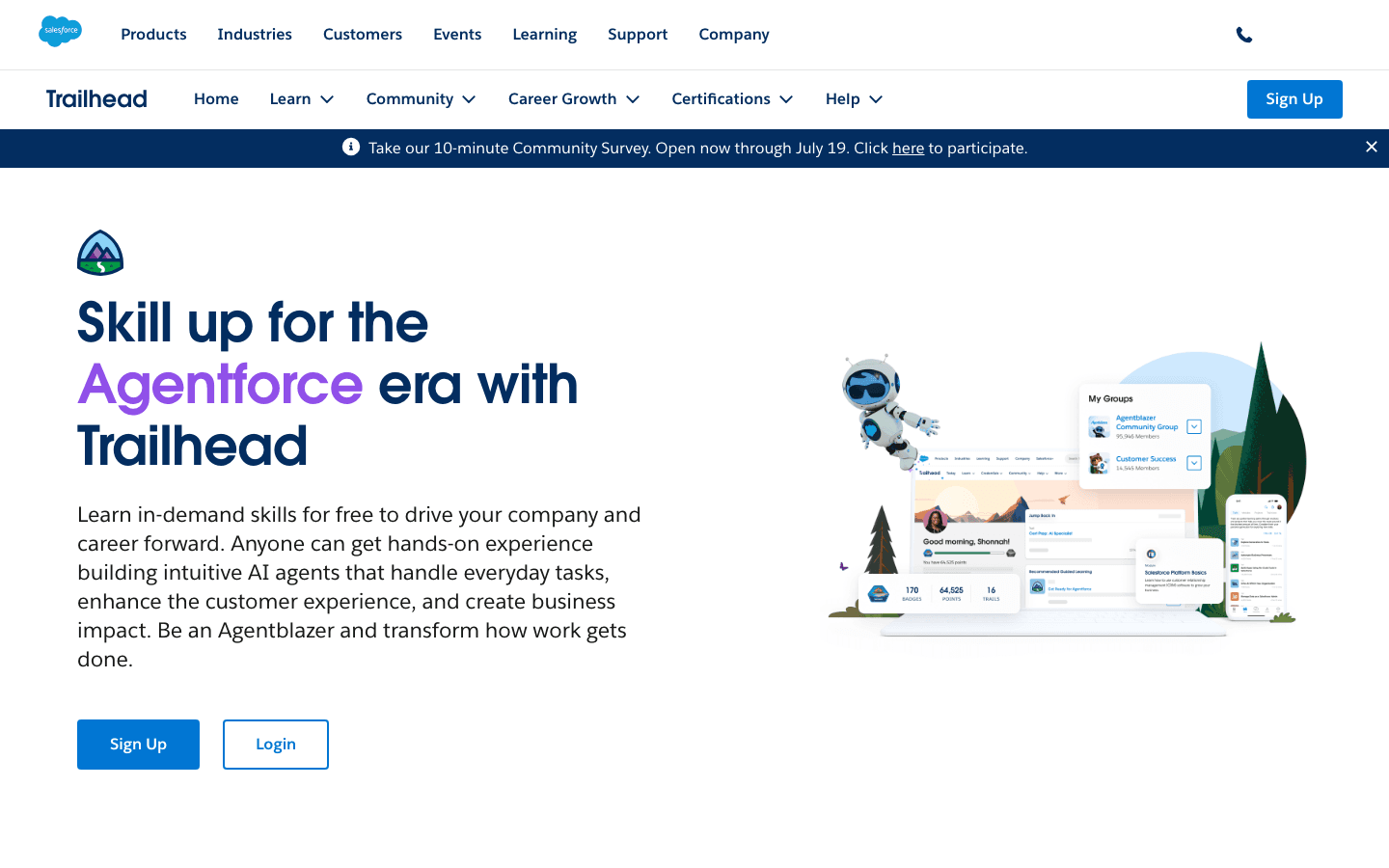
That counter is not decoration. Badges, points, and trails are the three units Salesforce uses to turn "learn the product" into a game with a visible score, the same structure Adobe ran on Photoshop over a decade earlier: a specific completable action, a named reward, and a running total the user can watch go up.
4. Reward the outcome, not the navigation. A badge should fire when the user finishes the action that predicts retention, not when they merely open the menu that contains it. Adobe's badges fired on finished edits, a whitened smile, a swapped color, a completed touch-up. Fire yours on outcomes the same way.
The read
- The checklist is a filter, not a tutorial. Its job is not to teach every feature. It is to walk a new user through the handful of actions you already know separate a retained user from a churned one.
- A named mission survives longer in a user's head than a labeled step. "Level 2: No Regrets" gets remembered and repeated. "Step 3 of 5" gets closed and forgotten.
- The score is the interface, not a side panel. Trailhead puts badges and points in the hero image itself. Adobe put a scoreboard inside the tool. Bury the count on a profile page nobody visits and you lose the entire mechanic.
Steal it
Pull your own retention split before you touch a line of UI. Compare the first-week event logs of users still active at day 90 against users who churned inside 30, and write down the actions that show up almost everywhere in the first group and almost nowhere in the second. That list is your mission set. Do not add one more action because a PM likes the feature, and do not soften a badge into a plain checkbox because a designer thinks it looks cleaner. The entire mechanic depends on the actions being the ones that actually matter, not the ones that are easiest to instrument.
Defend it by keeping the missions honest. The moment you gamify an action that does not actually predict retention, the mission list becomes theater, and your best users notice before your data team does. The 2026 shift worth watching is onboarding platforms moving from one fixed mission list for every signup toward an AI layer that adapts per user. Pendo's product now predicts behavior and adjusts the journey in real time, and Chameleon's Copilot builds the campaign logic from a prompt instead of a PM hand-wiring each step. Neither replaces the analysis in step one. An AI that personalizes a mission list built on vanity actions just personalizes the theater faster.
Gotchas
- A badge for a vanity action teaches the wrong lesson. Gamify "upload a profile photo" because it is easy to track and you train users that the game is decoration, so they stop trusting the badges that actually matter.
- A fixed mission list goes stale. Retention drivers shift as your product changes. Re-run the day-90-versus-day-30 comparison on a schedule, or the mission list calcifies into exactly the static checklist you built it to replace.
- An AI-personalized sequence still has to be explainable. If a copilot is picking each user's next mission dynamically, you need to be able to say, for any mission it assigns, which retention data justified it. "The model decided" is not an answer your support team can give a confused user.