The Onboarding Teardown
Reverse-engineer their aha moment and nurture flow.
Every SaaS company builds two things nobody outside the building ever stress-tests: the exact run of screens between signup and the first real result, and the string of emails that fires once you go quiet after that. Both are public. You do not need their analytics dashboard. You need a working email address and the patience to let it sit for a few weeks.
What to do: Sign up for the competitor's product with a plus-addressed email, screenshot every screen to first value, mark every paywall the moment you hit it, then let the account go quiet for a week and log the emails that show up.
Why it works: The onboarding path is their live theory of what turns a signup into a customer. The drip sequence is their retention playbook, run against your own inbox for free.
Example: Airtable's July 2026 signup screen asks for nothing but a work email, no card, no plan picker, before it lets you in the door. Whatever gate they run, it is not sitting on this page. That single observation already tells you where they believe the trust has to be earned first.
Walk it through
I ran the public half of this against airtable.com in July 2026. Here is what came back. I did not create an account for this chapter. The two screens below are what anyone can capture without signing up. The rest of the play is exactly what you log once you do.
1. Screenshot the pricing page before you touch signup.
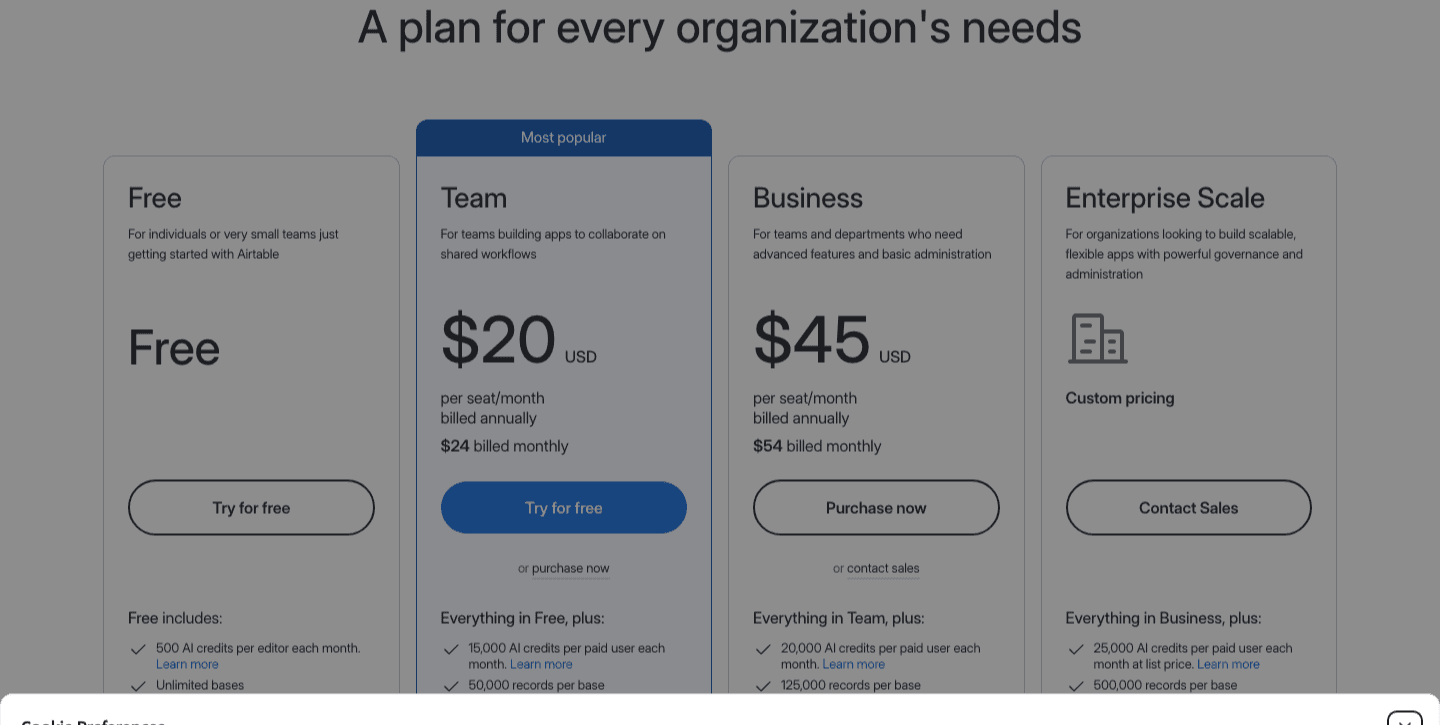
This is your baseline. Four tiers, Free through Enterprise Scale, and a detail that is easy to miss without a saved screenshot: every plan, including Free, ships a monthly AI-credit allotment, 500 credits on Free, 15,000 on Team, 20,000 on Business, 25,000 on Enterprise. Airtable is telling you where its next upsell lever lives before you have opened an account.
2. Build the alias, then open the signup screen and read it before you type anything.
hi+airtable@tomaslau.com
Plus-addressing keeps one real inbox alive for weeks, so it is still there when a drip sequence finally sends the pricing push. Temp-mail addresses expire before that email arrives.
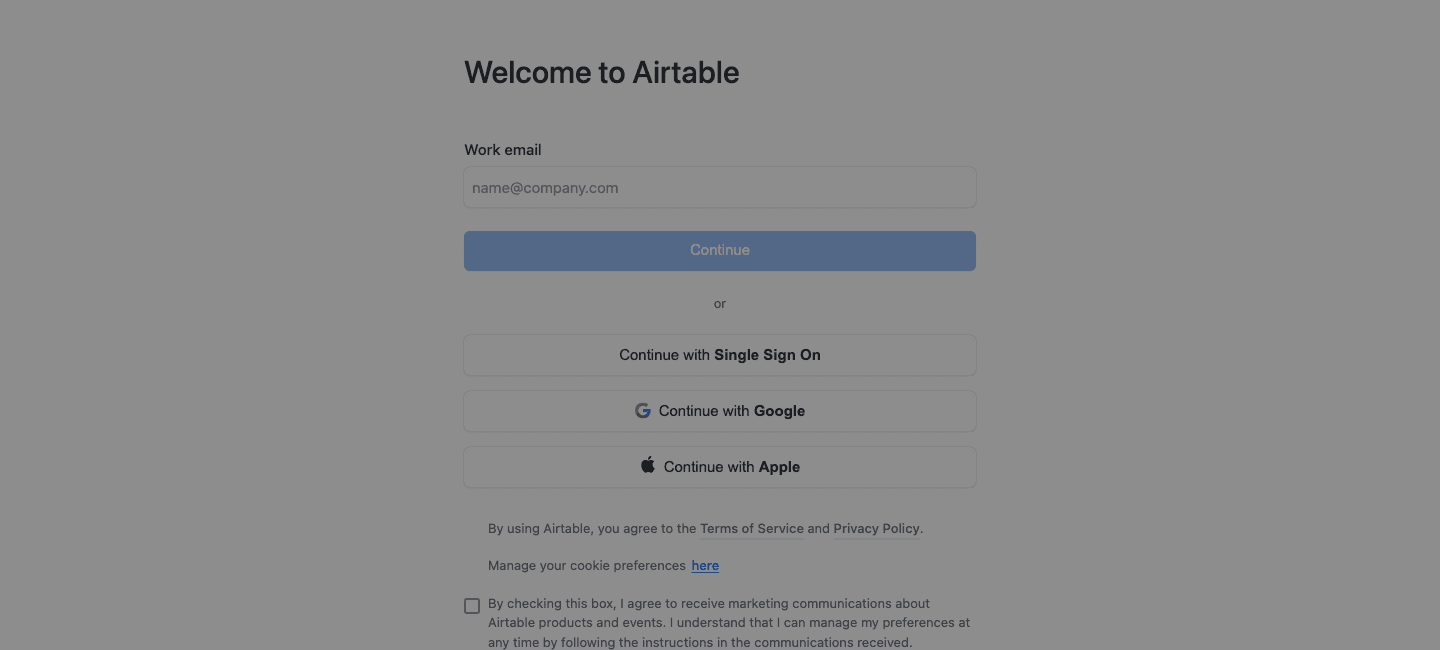
One field, "Work email," three SSO buttons, and a checkbox asking permission to send marketing email before the address is even verified. No plan choice, no card. Whatever paywall Airtable runs, it sits downstream of this screen, not on it.
3. Sign in with the alias and screenshot every step to first value.
Screenshot: each onboarding screen in order, workspace name, use-case picker, template or blank-base choice, ending on a marked shot of the exact screen where you see real data for the first time instead of an empty state.
Log the paywall the moment you hit it, not from memory later: step: feature -> free / paid / usage-capped. What matters is the order. A gate before that first populated grid and a gate after it tell you two different stories about what the product is optimizing for.
4. Stop touching the account. Let it sit a week and log what lands.
Screenshot: the inbox thread for the alias, one row per email, with day-offset from signup, subject line, and the single call to action each one pushes.
Do nothing for seven days and check daily. What comes back is not a reminder schedule. It is the company's own theory of what makes a dormant signup return, written in the order they chose to send it.
The read
- A gate before the aha screen means revenue first. If the paywall shows up before the user has seen a real result, the company is betting that credit-card friction loses fewer people than it costs them in a longer path to payment.
- A gate after the aha screen means the product is trusted to sell itself. The company would rather show you the win and risk you leaving as a free user than risk you never seeing the win at all.
- The entry screen leaks the strategy before you sign up at all. No plan picker and no card at the door means Airtable is betting the free tier converts on its own merits, and the AI-credit ceiling from the pricing page is the lever they pull once you are hooked, not before.
Steal it
Run steps one and two against three competitors in an afternoon. That alone tells you who front-loads monetization language at the door and who front-loads trust, before you spend a single week on any of them. Pick the one whose flow you most want to beat, then finish steps three and four for real, with your own alias, over the next two weeks.
Then turn it on yourself. Capture your own pricing page and your own signup entry screen the same cold way a stranger would see them. Check whether your paywall sits before or after your own aha moment matches the story you actually want to tell, and read your own drip sequence like a competitor would, looking for the email that gives away your whole retention play.
Gotchas
- Emails land in the promotions tab. Check there daily too, or a sequence that is running looks like one that never fired.
- Some signup forms detect and block plus-addressing. A few reject the
+character outright or fail silently on verification. Keep a real backup address ready before you start. - Signing up once with a working email to observe a flow is normal research. Scripting dozens of throwaway accounts to scrape a competitor's whole onboarding cohort or trigger their sales team's outreach at scale is not. That is where reconnaissance turns into abuse.